From chat replies to real actions
You’ve likely seen a model produce a helpful plan, a draft email, or a checklist—and then the work stalls because someone still has to copy, paste, log in, and click through three systems. The gap isn’t intelligence; it’s execution. A chat reply is just text. Real workflows depend on systems of record, permissions, and repeatable steps that leave an audit trail.
Tool calling is the shift from “tell me what to do” to “do the next step through an approved interface.” That might mean pulling the latest numbers from a database, creating a ticket, or scheduling a message. The practical constraint is that every action has a cost: API limits, latency, failure modes, and the risk of making the wrong change in the wrong place.
What tool calling actually is (and isn’t)
Picture the difference between asking an assistant to “check yesterday’s signups” and giving it a button that can actually query your analytics system. Tool calling is that button, but structured: the model returns a typed request like “use tool X with these inputs,” your app runs the tool, then the model continues with the tool’s results. The model doesn’t secretly browse, click around, or gain new access. It can only act through the tools you expose, under the permissions you enforce.
That’s also what tool calling isn’t. It’s not a magic integration layer, and it’s not a guarantee the action was correct. The model can pick the wrong tool, format inputs incorrectly, or misinterpret the output, especially when tools return messy data or ambiguous errors. Reliability comes from the surrounding system: clear schemas, validation, idempotent actions, and explicit “no-op” paths when confidence is low or the stakes are high.
When tool calling beats prompting alone
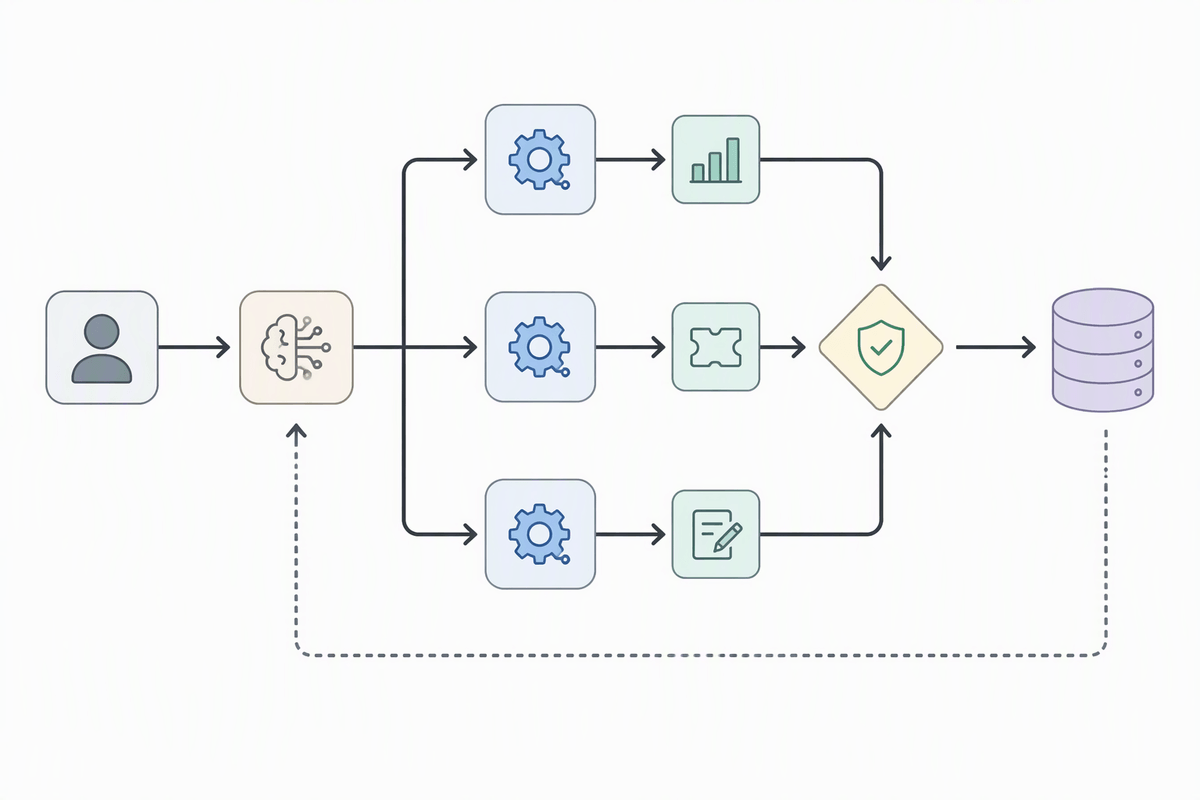
You can usually feel when prompting alone is starting to strain: the answer depends on “the latest” information, needs to touch multiple systems, or must be verifiably correct rather than merely plausible. If a model is drafting a weekly status update, it can write well from your notes. If it’s expected to reconcile pipeline totals across CRM, billing, and a spreadsheet, plain text reasoning becomes guesswork unless it can fetch the numbers, show its inputs, and repeat the same steps next week.
Tool calling wins when the value is in controlled access and repeatability. A typed request to “query metrics,” “create ticket,” or “update record” can be validated before anything happens, logged after it happens, and re-run deterministically when something fails. It also reduces brittle prompt instructions like “be careful not to…” because the safety boundary moves into code and permissions.
The trade-off is real overhead: you have to maintain integrations, handle rate limits and partial failures, and design around latency. For lightweight one-off thinking tasks, prompting stays cheaper and faster.
Designing tools the model can use reliably
Most tool-calling failures look like “bad model behavior,” but the root cause is often tool design. If a tool takes a vague blob of text like “customer info” and returns an unstructured paragraph, you’re forcing the model to guess where fields start and end, and you’re making validation almost impossible. Reliable tools feel boring: small surface area, explicit inputs, and outputs that a program (and the model) can parse without interpretation.
Start by designing around the decision points you actually care about. Split “update account” into “find account,” “preview changes,” and “apply changes,” so the model can’t skip straight to mutation without first producing identifiers and a diff. Use stable IDs instead of names, constrain enums, and make time ranges explicit (including timezone) so “last week” can’t drift. Keep responses compact: return the few fields needed for the next step, plus a clear status and error shape. The cost is extra endpoints and plumbing, but it pays back in fewer silent mistakes and simpler retries.
Keeping automation safe: permissions and guardrails

In a real workflow, the model’s biggest risk isn’t “being wrong,” it’s taking a wrong action with real permissions. Treat every tool as a capability, not a convenience: read tools and write tools should be separate, and write tools should require the narrowest scope possible (which fields, which objects, which workspace). A practical pattern is to force a “preview” response for any mutation—show the record ID, the proposed change set, and the expected side effects—then require an explicit approve step from either a human or a policy engine.
Guardrails work best when they’re enforceable in code. Validate inputs against schemas, reject ambiguous identifiers, and block risky operations by default (bulk deletes, external sharing, sending messages to large lists). Add contextual checks like “only update tickets you created” or “never message outside business hours,” and log every attempted call, including denied ones. The trade-off is friction: more prompts for approval and more engineering around policy, but it’s what keeps automation from quietly turning a small mistake into a system-wide incident.
Making it robust: retries, fallbacks, observability
You’ve probably seen the most frustrating failure mode: everything works in testing, then a real run hits a timeout, a rate limit, or a flaky upstream dependency, and the workflow either stops midstream or—worse—retries in a way that creates duplicates. Robust tool calling assumes tools will fail sometimes and designs for “safe repetition.” Make write operations idempotent where you can (use request IDs, upserts, or explicit de-dupe keys), and treat retries as a policy decision: which errors are retryable, how long you wait, and when you stop. Backoff and jitter reduce thundering-herd bursts, but they also add latency, which can matter in user-facing flows.
Fallbacks keep the work moving when the ideal path breaks. That can be as simple as switching to a read-only mode, asking for a missing identifier, or queuing the action for later rather than forcing the model to guess. Observability is what turns “the model messed up” into a diagnosable incident: log tool inputs and outputs (with redaction), capture correlation IDs across steps, and track metrics like success rate per tool, retries, and human-approval frequency so you can see drift before users feel it.
Putting it together in automated workflows
A familiar pattern is a weekly runbook: gather metrics, open or update tickets, notify owners, and file a short summary. Tool calling turns that into a workflow where the model orchestrates steps but never bypasses your system boundaries: fetch data through read tools, propose changes through preview tools, then apply changes only after approval rules pass. Keep each step small enough that failures are obvious, and store state (inputs, tool results, request IDs) so a restart doesn’t re-send messages or duplicate records.
The practical takeaway is to design for “boring automation”: deterministic tools, explicit handoffs, and a clear stop condition when something is missing. You’ll spend time wiring integrations and policies, but you get repeatable execution, auditability, and a pathway to scale from assisted runs to mostly hands-off runs.