Why tool access changes the risk profile
The moment an LLM can call tools, mistakes stop being “just text.” A bad answer is annoying; a bad action can email the wrong customer, delete a record, leak sensitive data into a ticket, or trigger a payment. The risk also becomes asymmetric: one successful prompt injection buried in a tool response can cause a chain of real operations, even if your user prompt looked harmless.
Tool access also changes who “owns” failure. You can’t rely on the model to remember policies consistently, and you can’t assume upstream data is trustworthy. Every integration adds attack surface, cost exposure, and compliance obligations. A single overly broad API key or missing rate limit can turn a rare model slip into an incident you have to explain, roll back, and prevent from recurring.
Decide what the agent is allowed to do
A familiar failure mode is letting an agent “help” by giving it one powerful credential and hoping instructions will keep it polite. Instead, decide capabilities first, like you would for a human role: read-only versus write, create versus delete, internal-only versus customer-facing. Make the default scope boring. If the agent’s job is to summarize account status, it shouldn’t also be able to issue refunds, change permissions, or export a full customer list.
Then separate routine actions from high-blast-radius actions. Routine actions can run with tight scopes and rate limits; sensitive actions should require explicit user confirmation, a second factor, or a human approver. Put dollar thresholds on payments, row-count thresholds on exports, and time windows on “bulk” operations. This can feel slower and more complex to build because it adds policy checks and approval UI, but it prevents a single bad tool call from becoming a costly incident.
Choose the right control model for execution

Most teams end up with three execution modes: auto-run, gated-run, and simulated-run. Auto-run is for low-risk operations with small, reversible effects, like fetching a record, drafting an email without sending it, or creating an internal note. Gated-run is for anything that changes customer state, moves money, or touches broad data sets. Treat “ask for approval” as a product surface, not an afterthought: show the exact tool call, parameters, and impact (“refund $48.20 to card ending 1234”) before it happens.
Simulated-run (or sandbox) is what keeps you shipping when you’re not confident yet. Run the same plan against test tenants, masked data, or a write-disabled API, then compare intended versus actual effects. Approvals slow workflows, sandboxes take engineering time, and dual environments can drift. The payoff is you can gradually promote actions from simulated to gated to auto-run as you observe real behavior and tighten constraints.
Design tools that are safe by default
A common pattern is taking an existing internal API and “wrapping it for the agent.” That usually imports every sharp edge: unbounded queries, optional parameters that unlock bulk access, and ambiguous endpoints like updateCustomer that can change ten fields at once. Safer tools look more like purpose-built verbs with narrow arguments: getAccountSummary(account_id), createDraftEmail(template_id, variables), requestRefund(order_id, amount_cents). Make limits non-optional: enforce max row counts, pagination, time ranges, and per-call spend caps inside the tool, not in the prompt. Prefer idempotent operations with explicit idempotency keys, and return stable identifiers so you can retry without duplicating side effects.
Tool outputs are also inputs, so treat them as untrusted. Return structured data with a strict schema, redact secrets by default, and avoid passing through raw HTML, ticket text, or “notes” fields without sanitizing. If the model needs a blob of text, provide a safe excerpt with provenance fields rather than the whole record. This takes extra engineering time and can slow early prototypes, but it prevents prompt injection and data leakage from becoming a recurring production fire.
Put guardrails where prompts won’t hold
You will still see failures that look like “the model ignored the rules,” but the fix usually isn’t a better prompt. Put the hard guarantees in code at the boundaries: a policy layer that evaluates every proposed tool call, plus allowlists for endpoints, fields, and tenants. Validate arguments against schemas, clamp values into safe ranges, and reject anything that expands scope (for example, missing filters, unusually large limits, or a request to switch account_id mid-session). Treat tool responses as hostile, too: scan for instructions, strip markup, and never let a tool output directly become a privileged input to another tool without re-validation.
Guardrails also need to handle rate, cost, and concurrency. Add per-user and per-agent budgets, exponential backoff, and circuit breakers when error rates spike. These controls will occasionally block legitimate work and create extra support tickets, especially early on, but they keep the inevitable weird edge case from turning into a data export, an email blast, or a runaway bill.
Make actions observable, reviewable, and reversible
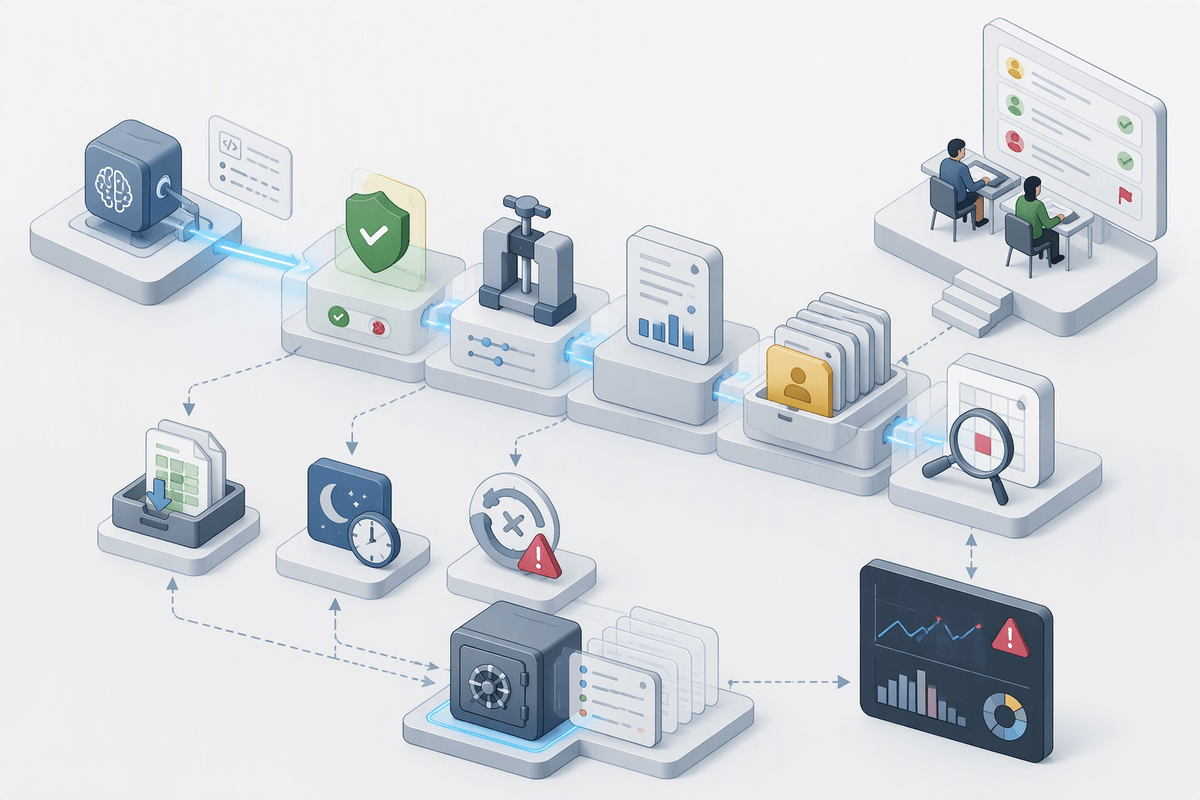
You’ve probably seen the uncomfortable version of this: a customer asks “why did your system do that,” and you can’t answer beyond a vague prompt transcript. Treat every tool call like an auditable transaction. Log the proposed action, the policy decision, the final parameters after clamping, the caller identity, the target tenant/resource IDs, and the before/after state when feasible. Make those logs easy to query by user, account, and incident window, and capture a human-readable “intent summary” alongside the raw payload so reviewers aren’t reverse-engineering JSON during an outage.
Reviewability means building a paper trail that supports approvals, post-hoc sampling, and automated anomaly detection. Flag unusual deltas (large exports, off-hours changes, repeated retries) for queue-based review, and keep a replayable record of tool outputs so you can reproduce decisions without re-hitting production systems. This adds storage cost and privacy work, especially if you need retention limits and redaction.
Reversibility is the difference between an incident and a nuisance. Prefer soft deletes, versioned writes, compensating actions (refund reversal, email recall where supported), and idempotency keys tied to a durable action ID. When you can’t undo an action, force it into gated-run and make the irreversible part explicit before execution.
A practical rollout plan that keeps control
The rollout that keeps you safe is staged, with promotion gates tied to evidence rather than confidence. Start in simulated-run on real-looking workloads (test tenants, masked data), then move the smallest reversible actions to auto-run while everything else stays gated. Add clear thresholds for promotion: low policy-deny rates, low retry loops, stable latency, and no unexplained cross-tenant access attempts. Keep a kill switch that can disable write tools per tenant or globally without redeploying.
Operationally, treat approvals and audits as ongoing, not just launch-week. Sample auto-run actions for review, rotate credentials, and tighten scopes as you learn actual usage. Budget for the unglamorous work: building approval UI, maintaining schemas, and handling “blocked but legitimate” cases without training users to bypass controls.